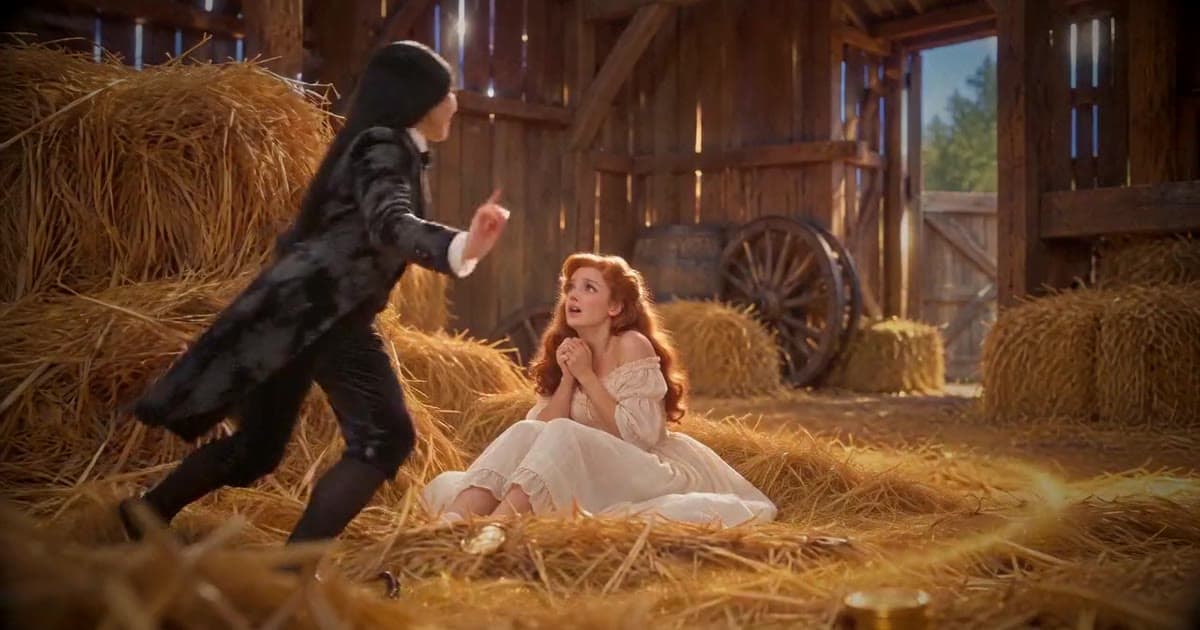
How We Built the Rumpelstiltskin AI Video Generator
Inside our Rumpelstiltskin AI video pipeline: costume references, failed motion tests, versioned prompts, and the checks behind a photo-to-dance tool.
A portrait can look right and still become the wrong person when it starts moving. That was the first hard lesson in how we built Rumpelstiltskin AI, our photo-to-video tiptoe dance generator.
The product asks for one photo. Behind that simple input, we had to solve several different problems: preserve a person's identity, put them in the right costume, direct the movement, finish the file, and decide which failures a machine could reliably catch.
This is the build story. For upload instructions and the four-video gallery—three generated results plus the credited original reference—read our Rumpelstiltskin AI photo tutorial.
Want to judge the result before reading the engineering? Watch the examples on the Rumpelstiltskin AI video generator, then bring your own clear photo. The single-person tool makes an approximately 13-second, 720p video; one-time packs start at $5.99.
See the examples and make my dance →
An AI-assisted account of CreateFaceless's Claude Code-assisted tuning work, based on experiments recorded October 10–11, 2026. These were development tests, not a general benchmark or a guarantee for every photo.
The first problem: a good image was not a good video
Our early image tests concentrated on the recognizable “shh” pose. More detailed costume and film-style descriptions made the scene more convincing, but sometimes changed the person. We simplified the identity instructions and moved film grain into post-processing so it would not compete with the face inside the prompt.
Motion exposed a different set of problems. One video route redrew the face immediately. Another held it reasonably well until the camera moved down and left the head outside the frame. Generating three separate clips gave us more control over individual scenes, but the expressions and movement were too mild.
These were different failures. A sharper input image could not fix a camera that pointed at the wrong part of the body. A longer prompt could not guarantee that separate clips would perform the same dance.
We needed a repeatable representation of the scene before trying more variations.
Build the costume before directing the dance
We separated five reusable visual assets: a costume on a faceless mannequin, a fictional adult secondary character, curled shoes, an empty barn, and the gold and light for the ending.
For each person's photo, an image-editing step creates a full-body costume still from three inputs: the original photo, the costume, and the shoes. The original portrait remains available to the video step, rather than making the costume still carry all the identity information by itself.
The costume still is vertical even when the final video is landscape. Its job is to describe the person and outfit; it is not a fixed first frame that determines the output crop.
| Video reference | What it contributes |
|---|---|
| Original photo | The person's identity |
| Costume still | The person wearing the intended outfit |
| Costume reference | Clothing details |
| Fictional adult character | A separate character for reaction shots |
| Shoes | The distinctive footwear |
| Barn | A consistent setting |
| Gold | The ending's props and lighting |
Those seven inputs have a fixed order. The prompt refers to their positions, so the mapping is part of the template, not incidental file organization.
In the recorded single-person route, the video step used Seedance 2.0 Mini's reference-image mode. We requested 13 seconds, 720p, and no generated audio. Combining reference-image inputs with a first-frame input produced a parameter error in our integration tests; choosing the correct input mode mattered before any visual judgment was possible.
Turn a prompt into a versioned template
We studied the reference as a sequence of moments: approach, “shh,” reaction, grin, dance, shoes, ending. We used written timing notes to build an original template. The original meme footage was not an input to generation or a clip spliced into the result.
The prompt described 15 timed shots. Repeated blocks specified the scene, clothing, identity, and style for each shot. Even then, timing stayed approximate: one accepted landscape experiment produced about 12 detected shots because some short beats merged.
That distinction matters when calling something an AI video template. It guides a performance; it does not provide the frame-accurate control of a timeline editor.
Once we had an accepted version, we treated two prompts and five shared images as one versioned bundle. Changing a reference asset could change the result as much as changing the text. Both needed to travel together, and a new bundle needed another portrait and landscape review.
A portrait test used another face, with glasses and a moustache, while keeping the same prompt and reference scheme. Those details survived in the reviewed result. It gave us another useful case, not proof that every face would behave the same way.
What the Rumpelstiltskin AI video pipeline actually does
The working shape became:
Photo + costume + shoes
          ↓
Full-body costume still
          ↓
Original photo + costume still + five shared references
          ↓
One video-generation task with a timed shot sequence
          ↓
FFmpeg finishing and technical checks
          ↓
Downloadable video
Claude Code helped build and revise the experimental tooling. The useful output was more than code: saved prompts, named reference assets, generated files, contact sheets, and records of unsuccessful attempts made each decision inspectable.
FFmpeg handled predictable finishing work such as trimming, framing, pixel format, and the film treatment. We did not need another generative model to perform those operations. Contact sheets let us compare the sequence and spot changes in faces or framing without replaying every test from the beginning.
The tuning outputs were silent. The product packages an original-music version and a silent version separately. The latter lets a creator choose audio in their publishing app; our download does not include the trending RiFF RAFF track.
For a deeper account of the experiments and reference mapping, see our technical Rumpelstiltskin AI pipeline write-up on DEV.
The quality check also needed debugging
An early identity score assumed the uploaded person should appear throughout the video. Reaction shots of the other character looked like failures. Wide shots and exaggerated expressions added more noise. When cut detection missed a boundary, a supposedly shot-aware score could combine two different people.
That made the score a poor final judge of whether someone would recognize themselves. We removed face-similarity scoring as a production blocking condition and kept deterministic technical checks for problems such as failed tasks, unreadable files, black frames, and frozen output.
A valid MP4 can still contain an unconvincing performance. We keep that limitation visible: results vary with the source photo, and the public examples show the style rather than promising a perfect likeness.
The experiment tooling also tracked spending before paid calls and recorded submitted tasks. Interrupting a local command did not mean a provider task had stopped or that no cost had been incurred. Keeping a record of each attempt helped us avoid confusing a stopped terminal with a cancelled generation.
What this means when you use the generator
You do not need to assemble the seven references or write the shot sequence. You supply one clear photo, choose vertical or landscape, and use the prepared workflow. Generation begins after payment; the public examples are available to watch before buying.
The practical choices are still yours: whether the style fits the post you want to make, which photo to use, and whether the finished result is ready to share. Our photo and format walkthrough covers those decisions. Our MP4 to TikTok format checklist helps with the final upload review.
Two-person mode is in development and coming soon. A reviewed experiment is a step toward integration, not a claim that the public tool already supports pairs of photos.
Try the result of the tuning work. Compare the real examples, choose a photo where your face is clear, and make your own version of the tiptoe dance. The packs are one-time purchases, separate from the main CreateFaceless subscription.
Author

Categories
More Posts
How to Make a Rumpelstiltskin AI Video From Your Photo
Learn how to make a Rumpelstiltskin AI video from your photo. Watch three results, choose your format, and make a watermark-free video from $5.99.
Instagram Reel Cover Size and Safe-Zone Checklist
Prepare Reel covers and 9:16 MP4 exports with safe-zone checks before manually publishing faceless videos to Instagram with clear mobile framing.
MP4 to TikTok Format Checklist for Faceless Videos
Check TikTok-ready MP4 format, captions, covers, and manual upload boundaries before posting a faceless vertical video with a clear first frame.
Newsletter
Join the community
Subscribe to our newsletter for the latest news and updates