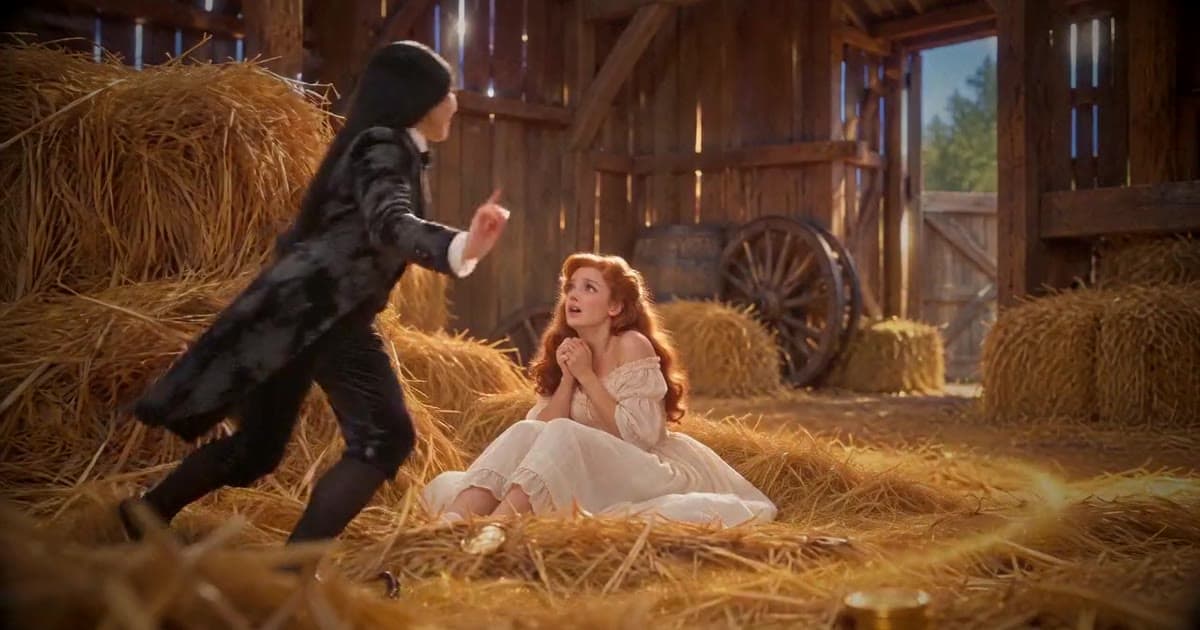
How to Make a Rumpelstiltskin AI Video From Your Photo
Learn how to make a Rumpelstiltskin AI video from your photo. Watch three results, choose your format, and make a watermark-free video from $5.99.
You’ve seen the tiptoe dance. Now picture yourself doing it.
Here’s how to make a Rumpelstiltskin AI video with your own photo: upload one clear portrait, choose your format, and let a ready-made template create your dance. No prompt writing or video editing is needed.
With CreateFaceless’s Rumpelstiltskin AI video generator, you get an approximately 13-second, 720p MP4 without a watermark. One video costs $5.99 as a one-time purchase, with no subscription.
One photo · Original music + silent version · Download link by email
Written by the CreateFaceless team. The three generated examples below are our own results.
See three Rumpelstiltskin AI dance results
Start with the result you want to share. These are three finished videos made with our original template: two vertical examples and one landscape example.
Portrait 01 — for a vertical post
A CreateFaceless result in 9:16 portrait. Choose vertical for a full-screen TikTok, Reel, or Short.
Portrait 02 — another finished example
A second CreateFaceless portrait result. Watch both examples to decide whether this style is what you want to make.
Landscape — for a widescreen video
A CreateFaceless result in 16:9 landscape. Choose this when the video will appear in a horizontal layout.
Want your own version of the dance? You bring the photo; the template supplies the scene and movement. Results vary with the source photo, so use the examples to judge the style before buying.
Make a Rumpelstiltskin video with my photo →
Start with one video for $5.99. No recurring subscription.
The original tiptoe meme — reference only
Original video by Tatyana Tereshchenko and collaborators. This reference is not a CreateFaceless result. Our generator uses a separate original AI template; it does not paste your face into this footage.
How to make your Rumpelstiltskin AI video in five steps
1. Pick a photo with a clear face
Use a recent, sharp photo of one person facing the camera. A head-and-shoulders or half-body photo in even light is a good starting point. Avoid sunglasses, heavy filters, group shots, and hands covering the face.
Accepted formats are JPEG, PNG, or WebP, up to 4 MB. Use your own photo or one of another adult who has agreed to appear. The tool does not accept photos of minors, celebrities, politicians, or other public figures.
This template makes one human dancer. Two-person and pet versions are not available.
2. Upload your photo and choose the frame
Open the generator using either of the buttons above. Upload the photo and choose:
- 9:16 vertical if you want a portrait post for TikTok, Instagram Reels, or YouTube Shorts.
- 16:9 landscape if you want a horizontal video.
Choose before generating rather than cropping afterward. The three examples above show both formats. There is no Rumpelstiltskin AI prompt to write: the template already defines the tiptoe dance.
3. Choose your pack and enter your email
| Pack | One-time price | Price per video |
|---|---|---|
| 1 video | $5.99 | $5.99 |
| 3 videos | $12.99 | About $4.33 |
| 10 videos | $34.99 | About $3.50 |
For a first attempt, the single-video pack is the smallest purchase. If you already want several videos, compare the larger packs. These are the Rumpelstiltskin packs, separate from CreateFaceless’s main subscription plans.
Enter the email where you want the download link. You do not need to create a password or sign up separately before starting. Automatic account creation is offered in the checkout flow; you can untick it.
Payment comes before generation. If generation fails, the service retries automatically; if it still fails, the video credit is returned. A returned video credit is not an automatic cash refund.
Review your format and pack on the generator page before paying.
4. Download your video without a watermark
When the video is ready, open the link sent to your email. You receive a 720p MP4 in your chosen format, with two audio options:
- Original music: our tiptoe tune is already included.
- Silent: add your own audio later.
The clip is approximately 13 seconds long. That describes the finished video, not the generation waiting time.
Play the full result before sharing. Check the face, motion, framing, and sound. For your final TikTok upload check, use our MP4 to TikTok format checklist.
5. Add a caption and share your tiptoe meme
A caption gives the dance a reason to happen. Try a setup such as:
- “Me sneaking into the kitchen after saying I’m going to bed.”
- “Trying to leave the party without another goodbye.”
- “When the delivery arrives and nobody else has noticed.”
If you know the trend as the “tiptoeing in my Jordans” meme, you may want to add a platform sound. Our downloads do not include RiFF RAFF’s “Tip Toe Wing In My Jawwdinz.” Use the silent file and check the audio options and permitted uses available to your account in the app.
For Reels, our Instagram Reels dimensions and safe-zone guide can help you position added text. Its general 1080p recommendation does not change this template’s 720p output.
Label the video as AI-generated and upload it yourself. Creating the MP4 does not automatically post it to your social accounts.
Curious how the template was made? Read how we built the Rumpelstiltskin AI video generator, including the reference assets, motion experiments, and quality checks behind it.
Before you make your own
Is the Rumpelstiltskin AI video generator free?
No. You can watch the examples before buying, but generation starts at $5.99 for one video. There is no free generation tier or recurring subscription for these packs.
Do I need a Rumpelstiltskin meme template or a prompt?
The template is included. You only need your photo and preferred format. There is no separate template download, prompt field, or editing timeline to set up.
Will it copy the original meme exactly?
No. CreateFaceless makes your version using its own original template. The three results above show the available style; this is not an exact, shot-for-shot face swap of the original clip.
Your photo. Your tiptoe moment.
Choose a clear photo, pick portrait or landscape, and make a version you can share. Start with one video if you want to try the result before buying a larger pack.
Make my Rumpelstiltskin AI video →
From $5.99 · One-time purchase · No watermark · Original music + silent version
Author

Categories
More Posts
How We Built the Rumpelstiltskin AI Video Generator
Inside our Rumpelstiltskin AI video pipeline: costume references, failed motion tests, versioned prompts, and the checks behind a photo-to-dance tool.
Instagram Reel Cover Size and Safe-Zone Checklist
Prepare Reel covers and 9:16 MP4 exports with safe-zone checks before manually publishing faceless videos to Instagram with clear mobile framing.
MP4 to TikTok Format Checklist for Faceless Videos
Check TikTok-ready MP4 format, captions, covers, and manual upload boundaries before posting a faceless vertical video with a clear first frame.
Newsletter
Join the community
Subscribe to our newsletter for the latest news and updates