I Finished a Faceless YouTube Short and Still Wouldn't Publish It
A founder's production lessons from inconsistent visuals, failed timing checks, and building a review-first workflow for faceless YouTube Shorts.
Quick answer
The hardest part of making a faceless YouTube Short is not getting an AI system to generate a video. It is catching a weak or inconsistent direction before voice, images, captions, and rendering turn it into an expensive finished file you still do not want to publish.
That is why I am building CreateFaceless around a review-first faceless video workflow: approve the hook, script, and visual plan; check real voice timing; then generate the full Short and review it again before export.
Disclosure: I used AI to help edit this article. The sample incidents and measurements come from my own CreateFaceless build records.
The finished Short I kept off the samples page
One of the first Shorts I made for CreateFaceless was technically finished.
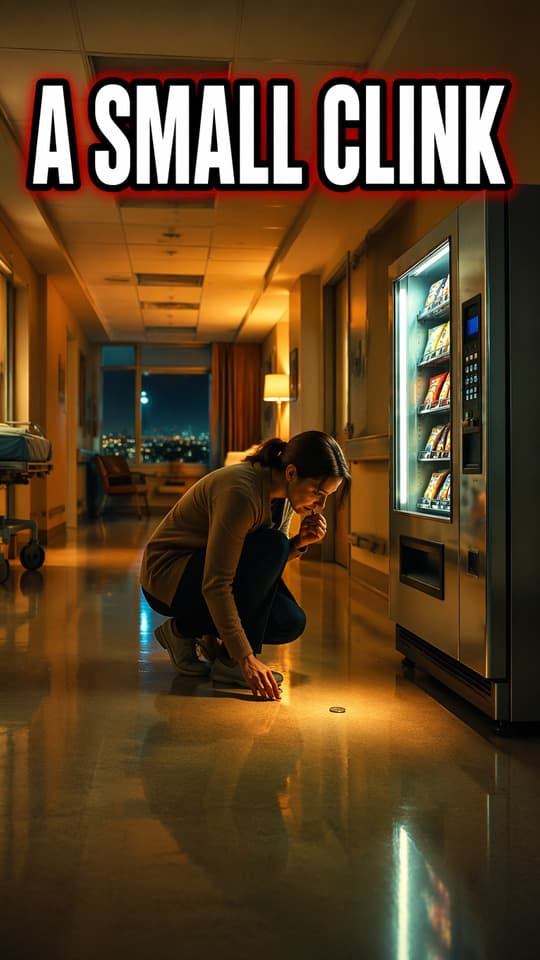
It was a short Jesus story about a hospital vending machine that gives someone exact change after a prayer. The video rendered, and the story worked, but I still kept that version off the public samples page.
The problem was visual consistency. Some scenes looked like warm storybook illustrations. Others felt as if they came from a different video. No individual frame was completely broken, but the sequence did not feel like one coherent Short.
That matters more than it sounds. A viewer does not grade each asset separately. They experience the hook, narration, images, captions, motion, and music as one piece. When the visual language changes without a reason, the video starts to feel assembled rather than directed.
I regenerated the sample with a tighter warm-illustrated direction before I was willing to use it as public proof. The revised version became one of the public CreateFaceless samples.
That experience forced an uncomfortable distinction:
Generated is a system status. Publishable is a creator decision.
An AI video pipeline can complete every job successfully and still produce something the creator does not want on their channel.
The same failure appeared before image generation
A different sample showed why this problem should be caught as early as possible.
The script was 127 words and was meant to become a roughly 50-second Immersive History Short. After voice generation, the segmented narration ran for 59.08 seconds.
At that point, the pipeline already knew the timing was wrong. Continuing would have meant generating images, captions, transitions, a cover, and a final MP4 around a duration I did not want.
So the workflow stopped before image generation. I lowered the script target and changed the voice route instead of asking every downstream step to compensate for a pacing mistake.
That was not just one unusually slow voice. Across five sample niches, the same voice delivered between 2.08 and 2.70 words per second depending on the writing style. A suspense script with short lines and dramatic pauses ran to 62 seconds against a 50-second target.
The lesson was not that one provider was bad. It was that a global words-per-second assumption was too simple. Niche, sentence structure, punctuation, pauses, and delivery style all changed the real duration.
The cheaper checkpoint was not "did the render finish?" It was "does the reviewed script still fit after real voice timing?"
What creators describe in less technical language
These are production samples, not user metrics. CreateFaceless has not been live long enough for me to claim that a certain percentage of creators experience the same failures.
But while researching faceless-video workflows, I kept finding the same underlying problem described in ordinary creator language:
- The script is generic and needs another rewrite.
- The B-roll does not match the narration.
- The voice is technically clean but emotionally flat.
- The pacing feels slow after all the scenes have been generated.
- A regeneration spends more credits without fixing the underlying direction.
- The "one-click" result still needs another hour in an editor.
The common pain is not simply slow generation. It is paying the cost of a bad direction before knowing whether the result is worth finishing.
Sometimes that cost is provider credits. Sometimes it is cleanup time. Sometimes it is the hesitation to publish a generic-looking video that could make a faceless YouTube channel feel interchangeable with dozens of others.
AI made the first draft faster. It did not remove the editorial judgment required to decide whether that draft deserved to become the final video.
The search journey points to one larger job
The same pattern appeared when I mapped the search terms around the product.
People begin with faceless YouTube channel ideas because they need a niche they can sustain. Then they look for an AI faceless video generator because they do not want filming and editing to become a full-time job. After generating a video, they look for YouTube Shorts best practices, SEO guidance, titles, covers, and upload instructions because a finished file is not the end of the task.
Those queries belong to different SEO pages, but they describe one user journey:
- Choose an idea worth repeating.
- Turn it into a coherent Short without doing every production step manually.
- Check that the result meets the creator's own publishing standard.
- Package and publish it consistently.
That is the largest common problem CreateFaceless needs to solve. Speed matters, but only when it moves a creator closer to a video they are willing to publish.
Where review belongs in the pipeline
The easiest response to inconsistent output would be to add more regenerate buttons. That does not change when the creator discovers the mistake. It just gives them more ways to pay for another attempt.
A useful review-first workflow places checkpoints at decisions that are expensive or difficult to reverse:
| Checkpoint | Creator decision | What should not happen yet |
|---|---|---|
| Hook and script | Is this idea worth continuing? | Voice, images, and rendering |
| Shot plan and visual direction | Do the scenes belong to one story and style? | Final keyframes and motion plan |
| Real voice timing | Does the script fit the intended Short? | Full visual spend |
| Final preview | Would I put this on my channel? | Upload or scheduling |
CreateFaceless therefore generates the hook, full script, and shot plan before the full media pipeline begins. The creator can reject or regenerate the direction first. Real timing is checked before visual spend. The finished MP4 then gets a final preview, cover options, and YouTube metadata.
The complete faceless YouTube workflow explains the production sequence in more practical detail.
Review-first does not mean asking someone to approve every frame or understand internal artifacts. The system should still automate repetitive production work. Human attention should be reserved for the decisions where taste, channel identity, and publishing risk matter.
When review-first is not the right answer
Some creators genuinely want full autopilot. They may prefer volume, accept more variation, or run formats where every episode follows a stable template. A mandatory review step can feel like friction to them.
CreateFaceless has not yet proved that review-first is the larger market. The public samples prove that the pipeline can produce finished Shorts. They do not prove that I have chosen the right amount of human control.
There is also a limit to what review can solve. An approval screen cannot guarantee views, retention, monetization, or channel growth. It cannot turn a weak niche into a strong one. It can only move important decisions earlier and make the resulting production state easier to inspect.
For the first launch, CreateFaceless stops at MP4 export and copyable YouTube metadata instead of auto-publishing. That is partly a product choice and partly a trust boundary: writing to someone's YouTube account needs stronger verification than generating a file they can inspect.
The product question I still need answered
The goal is not to make AI video generation slower. It is to stop the pipeline while a mistake is still cheap and understandable, then automate the work that follows an approved direction.
If you make faceless Shorts, what would you want to approve before rendering: just the hook, the full script, the visual plan, or would you rather review only the final video?
You can compare the current outputs on the CreateFaceless samples page, then use the review-first workflow guide to see how the checkpoints fit together.
Author

More Posts

How to Create a Faceless YouTube Channel Workflow
A review-first faceless YouTube workflow for making one Short with script, timing, visual beats, captions, music, cover, metadata, and MP4 export.

YouTube Shorts Hashtag Sets for Faceless Videos
Build focused YouTube Shorts hashtag sets by niche, intent, and final video promise without stuffing unrelated tags or obscuring the viewer promise.

YouTube Shorts Title and Description Template
A practical title and description template for faceless YouTube Shorts with reviewed scripts, captions, covers, and MP4 export.
Newsletter
Join the community
Subscribe to our newsletter for the latest news and updates